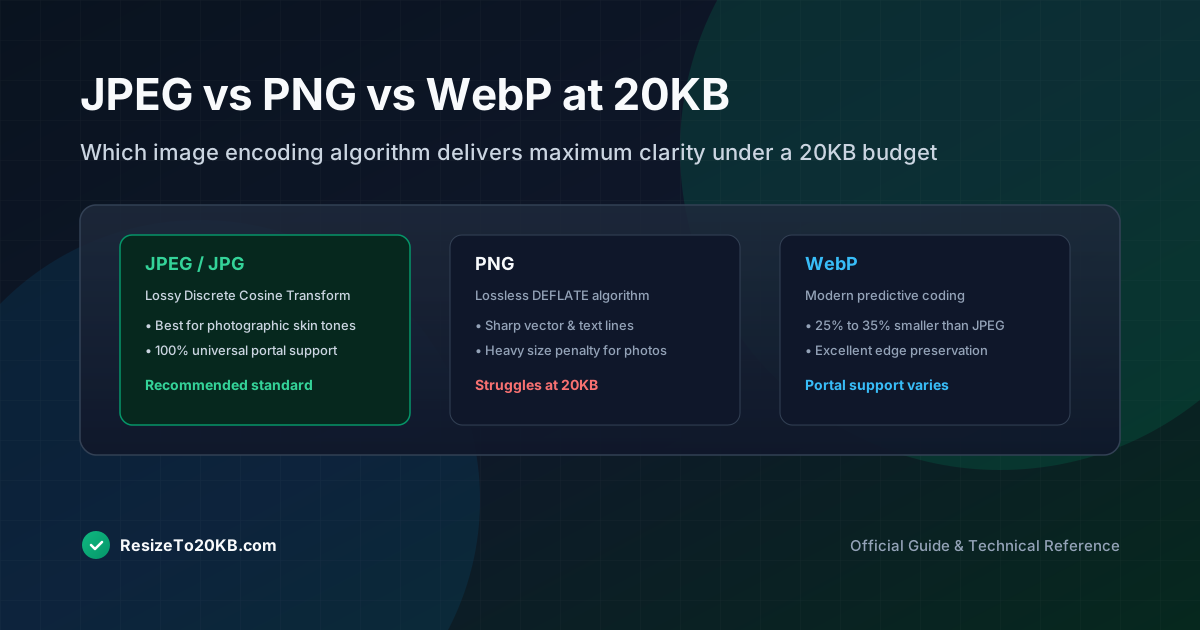
Choosing the right file format can make or break your attempt to hit a strict 20KB limit. JPEG vs PNG vs WebP each handle compression differently, producing noticeably different results at the exact same target file size. Here’s how they actually compare.
What Makes JPEG, PNG, and WebP Different?
JPEG uses lossy compression, discarding some data to shrink file size aggressively. PNG uses lossless compression, preserving every pixel exactly but producing larger files. WebP offers both modes, often outperforming both older formats.
Understanding these fundamental differences explains why the same photo can vary wildly in visual quality depending purely on which image format you choose before attempting to hit that strict 20KB target size requirement.
How JPEG Compression Performs at a 20KB Target
JPEG compression generally handles small file size targets well, especially for photographic content. Its lossy approach efficiently discards imperceptible detail, making it the most common choice for reaching extremely tight 20KB image format requirements.
Photos with smooth gradients and natural lighting compress particularly well under JPEG. This makes it the default recommendation for most passport photo and identification photo scenarios, where photographic realism matters more than perfect pixel accuracy.
Why PNG Can Become Difficult to Keep Under 20KB
PNG compression struggles at extremely small file sizes because it refuses to discard any actual image data. This lossless compression approach preserves quality perfectly but often results in significantly larger files than JPEG alternatives.
For simple graphics with few colors, PNG can still work well. But for detailed photographs, hitting 20KB with PNG often requires such drastic dimension reduction that the final image becomes too small to remain genuinely useful.
How WebP Handles Small File Sizes
WebP often outperforms both older formats at identical file size targets. Its modern compression algorithm typically preserves more visible detail than JPEG while still achieving smaller file sizes than equivalent PNG images.
Despite these advantages, WebP image compatibility remains slightly less universal than JPEG across older systems and some government upload portals. Always verify accepted formats before committing to WebP for critical official application photos.
How Transparency Changes the Format Decision
If your image requires transparency, PNG or WebP become necessary, since standard JPEG doesn’t support alpha channels at all. This requirement can override file size concerns when background transparency is genuinely essential.
For most identification and application photos, transparency isn’t required, making this a non-issue. But for logos, graphics, or layered digital assets, format choice often depends more heavily on transparency needs than pure compression efficiency alone.
What Happens to Text and Graphics at Low File Sizes?
Text and sharp graphic edges suffer noticeably under aggressive JPEG compression, often developing blurry or blocky artifacts around lettering. PNG preserves these edges far better, though at the cost of significantly larger file sizes.
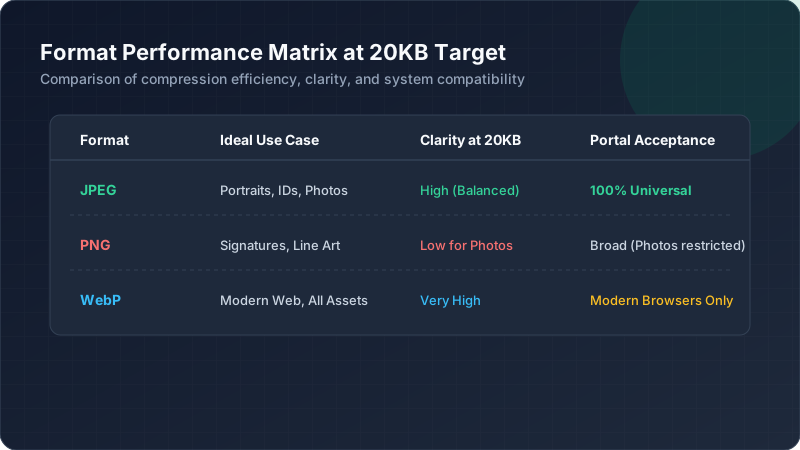
For documents containing text, this creates genuine tension. Here’s a quick comparison:
| Format | Best For | Weakness at 20KB |
|---|---|---|
| JPEG | Photographs | Blurry text edges |
| PNG | Graphics, text | Large file size |
| WebP | Both | Limited compatibility |
How Photographs Behave Differently From Illustrations
Photographic images with natural color gradients compress smoothly under JPEG. Illustrations and graphics with flat colors and sharp lines often compress better under PNG or WebP, since lossy compression tends to blur clean edges unnecessarily.
This distinction matters when choosing formats. A photo compression approach ideal for a face photo might badly distort a simple logo or line drawing, producing unwanted blurring around otherwise crisp graphic elements.
Which Format Preserves Detail When the File Must Stay Small?
For photographic content specifically, JPEG generally wins at extremely small file sizes. Its compression algorithm was specifically designed around photographic data, making it the most practical choice for most 20KB photo scenarios overall.
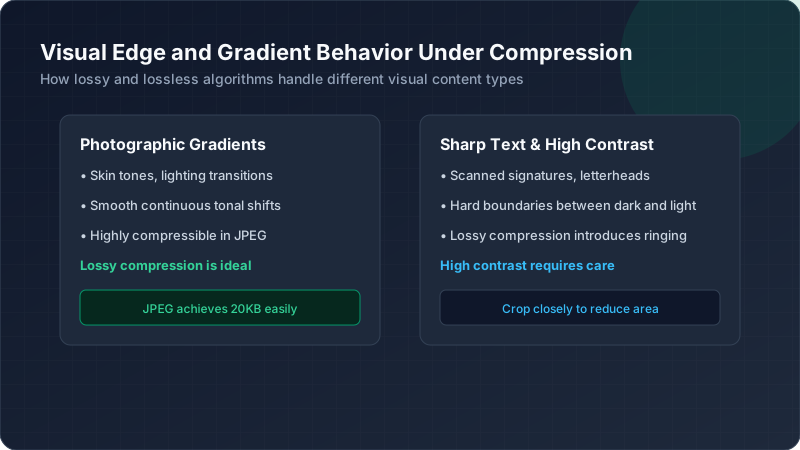
WebP comes close and sometimes exceeds JPEG quality at equivalent sizes, but universal acceptance remains its biggest limitation. When compatibility isn’t a concern, WebP often produces the best available image quality comparison results.
How Browser and Upload Compatibility Can Influence Your Choice
Not every upload portal accepts every format. Many government and official systems still require JPEG specifically, regardless of WebP’s technical advantages. Always confirm accepted formats before investing time compressing images in an unsupported format.
This practical limitation often decides the format choice regardless of pure quality comparisons. Even if WebP theoretically produces better results, JPEG remains the safer, more universally compatible choice for most official application upload requirements.
Conclusion: Choosing an Image Format for a 20KB Limit
When compatibility matters most, JPEG remains the safest, most reliable choice for hitting strict 20KB targets. WebP offers superior quality where accepted, while PNG suits graphics and transparency needs despite larger file sizes. Matching format to actual content and platform requirements makes all the difference.