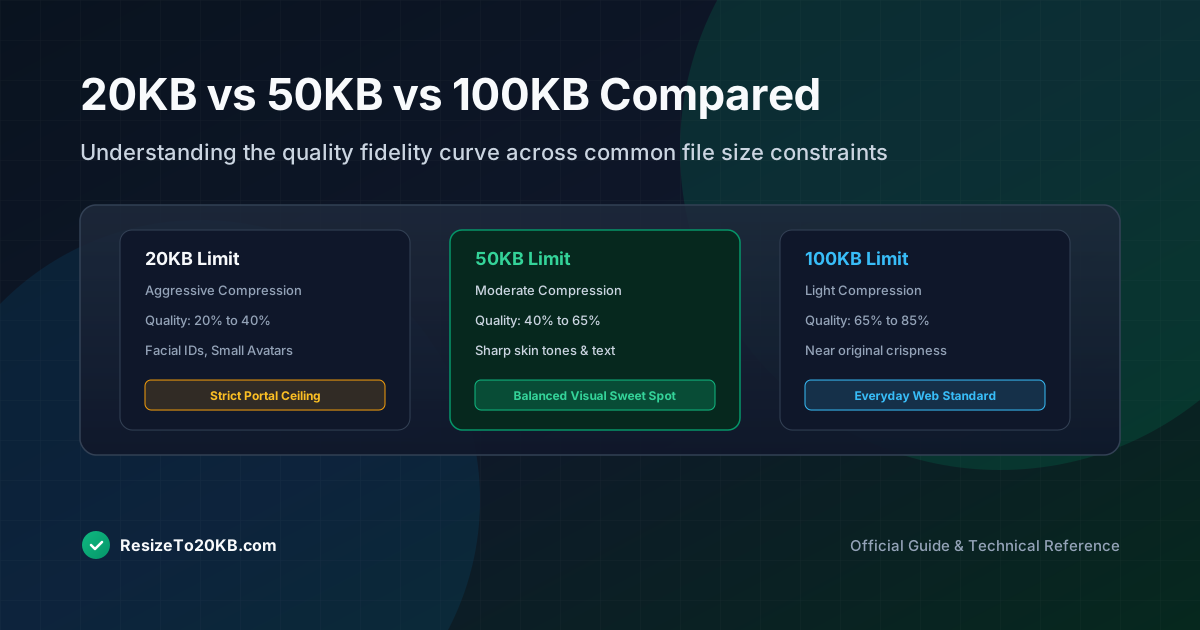
Not every form demands an impossibly strict 20KB limit. Some allow 50KB, others up to 100KB. Understanding what each threshold actually means for visual quality helps you choose wisely when a platform offers 20KB vs 50KB vs 100KB as flexible options.
What Changes When an Image Is Limited to 20KB?
At 20KB, compression becomes aggressive almost immediately. Fine detail, subtle gradients, and sharp text edges are typically the first casualties. This tight file size limit demands real compromise, especially for anything beyond simple, low-complexity photos.
Most 20KB image results remain usable for basic identification purposes, but rarely look impressive. Expect visible compression artifacts in shadows, gradients, or busy backgrounds, even when the overall photo remains technically acceptable for its purpose.
How a 50KB Target Gives You More Room for Detail
Doubling the target to 50KB provides noticeably more breathing room. Compression can be gentler, preserving finer detail in skin tones, hair texture, and background elements that a stricter 20KB limit would inevitably sacrifice.
This makes 50KB image targets considerably more forgiving for photos with genuine visual complexity. If given the choice, opting for 50KB over 20KB almost always produces a visibly cleaner, more professional-looking final result.
What a 100KB File Can Preserve That a 20KB File May Not
At 100KB, most photos retain nearly all their original visual character. Compression artifacts become minimal or invisible entirely, and fine details like individual hair strands or subtle skin texture remain clearly recognizable throughout the image.
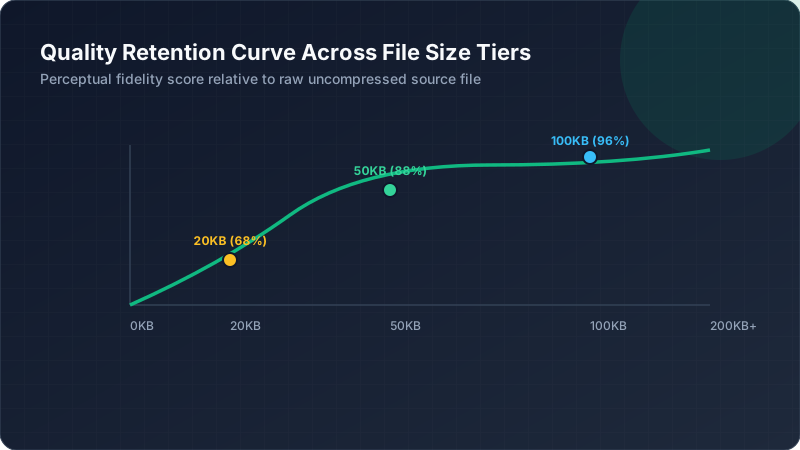
This level approaches what most people consider “normal” photo compression for everyday use, similar to typical social media upload quality. A 100KB image rarely shows obvious quality compromise compared to its original source file.
Why File Size Alone Cannot Predict Image Quality
Two photos targeting the same KB limit can look completely different based on image dimensions and visual complexity. A simple, low-detail photo at 20KB might look better than a busy, colorful photo compressed to 50KB.
This means file size file size comparison alone never tells the full story. Content complexity, dimensions, and compression algorithm choice all interact together, making blanket quality assumptions based purely on KB numbers genuinely unreliable.
How Dimensions Influence the Comparison
Smaller dimensions stretch a given file size budget further. A tiny 200x200 photo at 20KB often looks cleaner than a larger 600x600 photo forced into that same restrictive size, since less total detail needs preserving.
This relationship holds across all three size tiers. Whether targeting 20KB, 50KB, or 100KB, matching image dimensions appropriately to your target size consistently produces better results than fighting oversized dimensions against an undersized file limit.
How JPEG Quality Settings Change Across Different Targets
Here’s a rough comparison of typical quality settings needed:
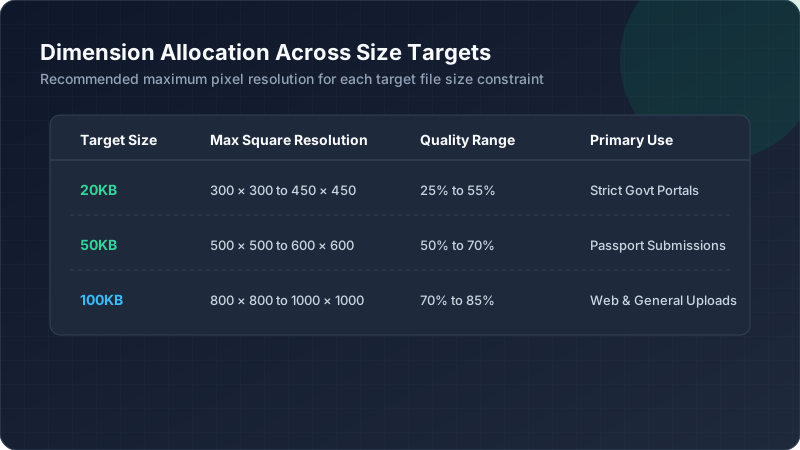
| Target Size | Typical JPEG Quality | Visible Artifacts |
|---|---|---|
| 20KB | 20-40% | Common |
| 50KB | 40-65% | Occasional |
| 100KB | 65-85% | Rare |
These numbers vary based on dimensions and content, but illustrate the general relationship between target size and achievable quality.
Why Photographs and Graphics Respond Differently
Photographic images with natural gradients tolerate compression more gracefully than graphics with sharp lines and flat colors. This means the same 20KB target might look perfectly fine for one image type while looking terrible for another.
Understanding your specific content type helps set realistic expectations. A detailed illustration might need closer to 50KB for acceptable image quality, while a simple photographic headshot could work reasonably well even at the stricter 20KB threshold.
How to Compare Images at the Same Pixel Dimensions
Fair comparisons require holding dimensions constant while varying only file size. Testing the same 400x400 photo at 20KB, 50KB, and 100KB reveals genuine quality differences without dimension changes confusing the actual comparison results.
This controlled approach shows exactly how much compression quality improves at each size tier. Without holding dimensions steady, it becomes impossible to isolate whether quality differences come from file size or dimension changes.
When a Larger File Size Is Worth the Extra Storage
If a platform allows flexibility, choosing 50KB or 100KB over 20KB almost always improves visible quality meaningfully. Only stick with the stricter limit when the platform specifically requires it or storage genuinely remains constrained.
For personal use, archiving, or anywhere file size isn’t strictly mandated, prioritizing image quality over unnecessarily small file size makes practical sense. Save aggressive 20KB compression specifically for situations that actually demand it.
Conclusion: Understanding the Trade-Off Between KB and Quality
Every step up in file size budget buys back meaningful visual quality. Twenty kilobytes demands real compromise, fifty offers noticeable improvement, and one hundred approaches typical everyday photo quality. Knowing this file size comparison helps you make smarter choices whenever a platform offers flexibility.